Life after BigQuery
For about three months now I've been experimenting with data analysis. It is, to say the least, fascinating. Life before having access to BigQuery and the live tables is not the same as life after.
The setup
At work I got access to BigQuery and to the live MySQL tables behind our logistics systems. I'm not a data analyst, and I'm not pretending to be one. What I do is connect BigQuery to Claude and ask it to do things. Pull this. Join that. Show me how these two tables relate. Tell me how many shipments went through this state last week.

Questions go right. Answers come back.
That's the whole technique. And that's where the beauty is.
The barrier used to be knowing SQL well enough to ask the question. Now the barrier is knowing which question to ask. That's a barrier a designer can clear.
What changed
Ideas get confirmed or killed. Every designer carries around hunches. Most of them stay hunches, because checking one means asking someone else to pull a report. Now I check them myself, in minutes. Some survive. Plenty don't. Both outcomes are useful.
Some hunches survive contact with the data. Some don't.
Design decisions have a floor under them. "I think users struggle with this step" is an opinion. A number pulled from the actual tables is a fact you can design around. When data enters a design discussion, the conversation changes. It stops being about taste and starts being about the problem.
I understand the problem better. Not just the ticket in front of me, but the thing underneath it. Reading the data forces you to be precise about what is actually happening, as opposed to what people say is happening.
I understand the domain better. This one surprised me the most. Exploring the tables meant learning the entities, how they relate to each other, and how everything connects. A schema is a map of how the business actually works, and I had never read ours before.
A real example
We had returns piling up in our facilities. When a shipment comes back, the seller gets it in one of two ways: we deliver it to their warehouse, or they come and collect it from one of ours. Some sellers refuse the delivery. Some never collect. Either way, those shipments sit in our facilities, take up space, and get in the way of day-to-day operations.
The fix had two halves. Going forward, automatically process anything that sits longer than a set number of days. That half was easy to define. The harder half was the backlog. There was already a weekly routine for this: someone runs a query, gets a list of shipments, and processes them according to policy.
So why was the backlog still growing?
I started asking the data. The answer was that the weekly query wasn't returning the full list. Every cycle, a few shipments fell through, and those were the ones accumulating. Slowly, for long enough that nobody noticed, until it was a problem you could see on the warehouse floor.
Every weekly run, a few shipments slipped past the query.
Once we knew where the leak was, the rest was straightforward. The query got fixed, and the backlog cleared.
I wouldn't have found that from a brief. And I wouldn't have found it without Claude sitting between me and BigQuery. I don't write SQL well enough to trace which rows a query misses. I do know what question to ask.
Not designing from a brief anymore
This is the part I keep coming back to. Before, I was designing for a problem I only knew through other people. The PM describes it, stakeholders add their view, and I work from that picture. That's normal, and there's nothing wrong with the people in that chain. But it means you're always one step removed from the system.
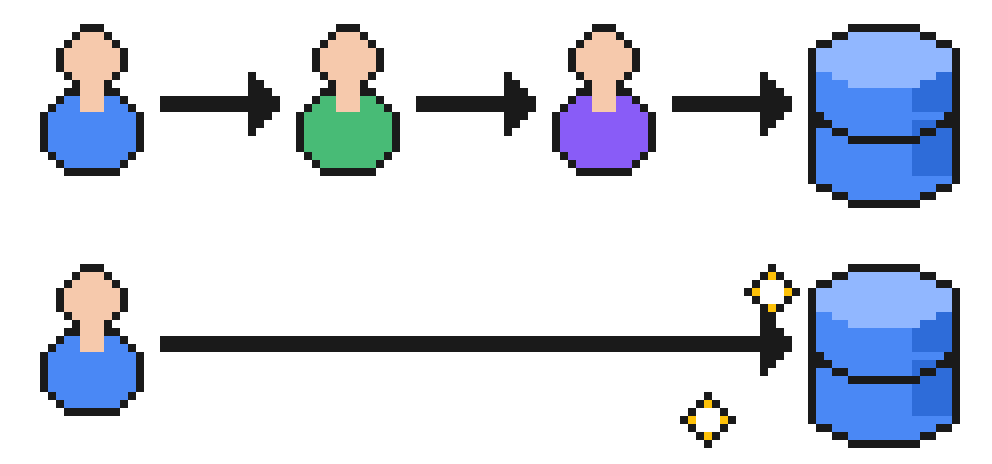
Before: the problem reaches you through other people. After: you go look.
Now I can go look. Verify the assumption. See the edge cases in the rows. Come back with a solution that's grounded in what's actually there.
It makes you a better problem solver. You're no longer disconnected from the system you're designing for.
A quick guide to BigQuery MCP
This is the setup I use: Claude Code in the terminal, talking to BigQuery through an MCP server. It's a handful of commands on a Mac.
1. Install the tools. Google's CLI handles sign-in, and uv runs the server.
brew install --cask google-cloud-sdk
brew install uv
2. Sign in so the server can use your Google credentials.
gcloud auth application-default login
3. Register the server with Claude Code. Swap in your project ID and the region your data lives in.
claude mcp add bigquery -- uvx --with "mcp<2" mcp-server-bigquery --project YOUR_PROJECT_ID --location EU
The --with "mcp<2" part pins the MCP SDK to a version this server still works with. Leave it in.
4. Check it's connected.
claude mcp list
5. Start asking. Open Claude Code and talk to it in plain English: "list the tables in the returns dataset", "how many shipments entered this state last week", "how do these two tables join". One habit worth building: ask it to show you the SQL it ran. That's how the domain knowledge sticks.
You only need read access to the project. Ask for exactly that.
Getting real answers out of it
I don't have a method for this. There's no fixed set of steps that turns "Claude can query BigQuery" into insight. But three months in, a few habits have done most of the work.
Start with the question, not the query. The useful prompts sound like a stakeholder talking, not a SQL tutorial. "Which returns have been sitting in our facilities longer than a month, and how many per seller?" beats anything with a JOIN in it. Claude writes the query. Your job is to know what's worth asking.
Give it context, a lot of it. A warehouse with thousands of tables is a maze, and Claude wanders it just like you would. What changed everything for me was building a small folder it can read before touching the data: a dump of the schema (every dataset, table, and column, exported once from the information schema), a lookup file that maps the cryptic codes in status columns to what they mean, and a glossary of the terms our org uses. Plus a short note that says where all of this lives and how to use it. With that in place, Claude stops guessing column names and starts reasoning about the system.
Confirm with the engineers. This is their field, not mine. A query can be syntactically perfect and still wrong, because a column doesn't mean what its name suggests, or because a status was repurposed two years ago. Before I act on anything, I show the query to the backend engineers on my squad. It takes them minutes, and it's caught things that would have embarrassed me.
Write down what you learn. Every answer teaches you something about how the business works. I fold it back into the glossary and the notes, so the next question starts further along than the last one did. Over three months, that folder quietly became the best documentation of our domain I've seen. More on that in a future post.
The skill worth building
There's a lot of noise about what AI means for designers, and most of it is about generating screens. After these three months, I think that misses the point. The most useful thing AI has done for me isn't drawing layouts. It's letting me read my own company's data.
That matters because of how design actually works. Data drives decisions, decisions drive design, and design built on informed decisions tends to be good design. Design was always about solving problems. A solution you can't back with evidence is just a preference, and in most rooms, preferences lose to whoever is loudest.
So if you're going to build one AI skill, don't make it prompting for layouts. Make it asking better questions of your own data.